What an AI assistant actually sees in your bank statement
Published: September 30, 2026
You upload a statement, an AI assistant reads it back to you as a tidy list of categories, and it feels like magic. It isn’t. It’s pattern matching on a handful of fields, some of which are precise and some of which are the model’s best guess dressed up as a fact. Knowing which is which takes about five minutes, and it changes how much you trust the output.
What’s actually in a bank statement
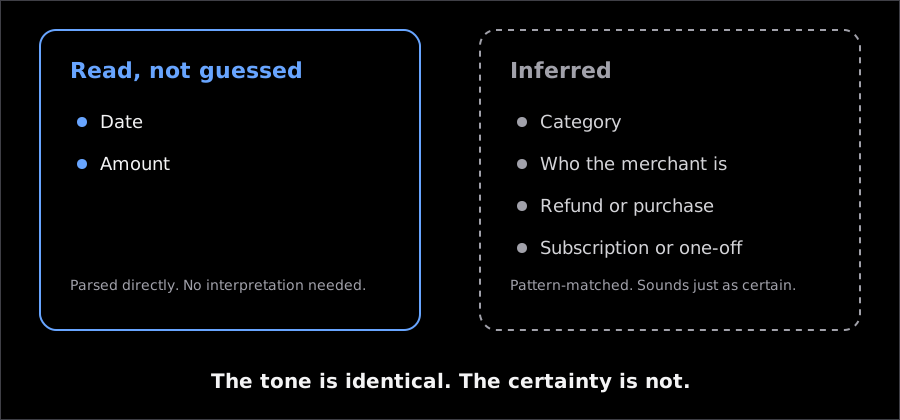
A typical line in a statement PDF or CSV export has four or five fields, and only two of them are unambiguous: the date and the amount. Everything else is text your bank’s payment processor generated for its own purposes, not for a human — or a model — to interpret.
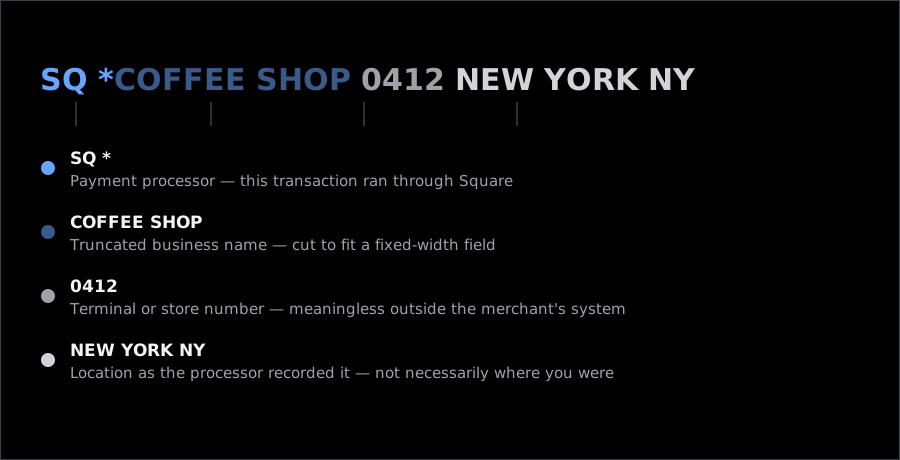
Take a real-looking example: SQ *COFFEE SHOP 0412 NEW YORK NY. The SQ * prefix means it ran through Square. 0412 is a store or terminal number that means nothing outside the merchant’s own system. The rest is a truncated, all-caps fragment of a business name. Compare that to TST* GOTHAM DINER NYC (Toast, a restaurant POS system) or PAYPAL *ETSY SELLER123 (PayPal routing a payment to a shop you’ve never heard of, on a platform you have). None of these strings were written to be read. They were written to fit in a fixed-width field on a settlement report.
Some statements also carry an MCC — a merchant category code, a four-digit number the card network assigns to the business (5812 for restaurants, 5411 for grocery stores). It’s a useful hint. But it’s assigned by the merchant’s bank when the account is set up, not by what you actually bought, and plenty of small businesses share a generic code with unrelated merchants. A drugstore that also sells groceries might carry either code. A balance line, when present, tells you what was left after the transaction, not before. That matters if you’re trying to reconstruct the order of events from a statement.
What a model reads with confidence
Dates and amounts are strings the model can parse almost perfectly, because they follow a small number of formats and there’s no ambiguity to resolve. $47.32 on March 3rd is $47.32 on March 3rd, whether a human or a model is reading it. This part of the job is genuinely mechanical, and it’s why an AI finance tool gets totals right almost all the time. Reconciling the sum of parsed transactions against the statement’s own printed total is a real, useful check, not busywork.
Everything past that point is inference, and inference is where confidence stops being a reliable signal. A model will tell you SQ *COFFEE SHOP 0412 is “Coffee & Dining” with the same flat tone it uses for the date. One of those is a fact. The other is a guess dressed as one.
Where the guessing turns into mistakes
Three patterns show up often enough to be worth knowing by name, because each one looks completely reasonable in the output and only breaks something a week later.
A transfer read as an expense. You send $200 to a friend through Zelle for your half of a dinner bill. The statement line says something like ZELLE PMT JOHN M, with no indication that this is money going to a person, not a business. A model categorizing by pattern often files it under “Other,” or worse, under a plausible spending category — and your dining budget looks blown for a meal you split fairly.
A refund read as income. A retailer refunds $85 for a returned jacket. The line looks almost identical to the original purchase, sometimes from the same merchant string. Depending on how the model handles it, that refund either quietly cancels last month’s spending (correct), or it gets logged as new income in a “Refunds” category that never shows up in your budget view. That’s technically accurate and still practically confusing.
One subscription, three categories. A streaming service that changes its price mid-year, or bills through a reseller one month and directly the next, can show up as three different merchant strings for one recurring bill. A model matching by string similarity has no reason to know these are the same subscription, unless the amounts and cadence line up closely enough to flag it.
None of these are the model being careless. They’re the model doing exactly what it was asked: turn ambiguous text into a confident-sounding label. The confidence is the part to watch, not the label itself.
Uploading a PDF vs. connecting your bank
There’s a real difference between handing an assistant one statement and giving it standing access to your account, and the marketing around AI finance tools tends to blur it.
Uploading a PDF or CSV is a single, bounded event. You chose the file, you chose the moment, and the assistant sees exactly what’s in that document — nothing from before the statement period, nothing after you close the chat. Connecting a bank through an aggregator like Plaid is different in kind, not just degree. It’s a standing authorization that keeps pulling balances and transactions on a schedule, across every linked account, for as long as the connection exists. Both experiences end with the same “your transactions are in” screen, which is exactly why it’s easy to lose track of which one you agreed to.
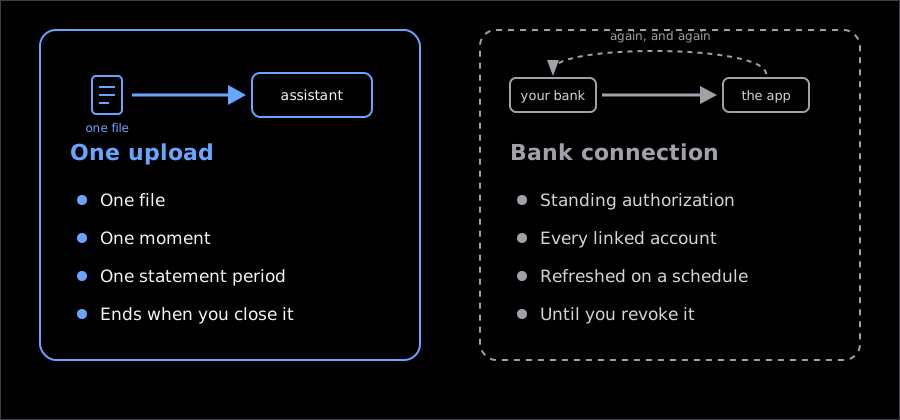
If you’re not sure which you have, look at the onboarding step itself. The aggregator scenario asks for your bank login credentials rather than a file. A one-time upload asks you to pick a file from your device. When in doubt, check your bank’s own security settings. Most banks list connected third-party apps on a page called something like “connected apps” or “data sharing” — and that list, not the finance app’s own settings screen, is the only reliable record of ongoing access.
What happens to the file after it’s read
This is the part almost nobody asks about, and it’s the one question that actually matters for a document with your account number and spending history on it. Before you upload anything to any assistant — not just ours — it’s worth getting a straight answer to a few questions:
- Does the file get stored after processing, or just the extracted transactions, or nothing at all?
- Is anything from my statement used to train the underlying model?
- Can an employee of the company look at my uploaded file or my chat history, and under what circumstances?
- Where does the data physically live — on the company’s own servers, or passed to a third-party AI provider?
- How do I delete what’s already been processed, and does that request actually reach every place a copy might sit?
A vague answer to any of these (“we take privacy seriously”) is itself the answer. A specific one names a retention period, a named subprocessor, and a deletion mechanism you can actually trigger.
For what it’s worth, here’s how we answer them for vaulink. Your ledger — the transactions, budgets, and history you’ve already logged — lives on your iPhone, the same way it works when you’re offline entirely. When you choose to import a statement, only that file leaves the device, for the single action of parsing it, and it isn’t stored afterward. That’s a narrower claim than “nothing ever leaves your phone,” and it’s the accurate one.
Checking the parse in about a minute
Before you trust a freshly imported statement, three quick checks catch almost everything that goes wrong, and none of them take longer than reading the statement itself.
First, does the total match? Add up what the assistant imported and compare it to the statement’s own printed total or ending balance. A mismatch of more than a few cents means something was skipped, duplicated, or miscategorized as a transfer and excluded.
Second, look at the five largest transactions by amount, not the ones with the most interesting-looking merchant names. Big numbers move a budget the most, and they’re exactly the ones worth a five-second glance: rent, a payment to your own savings account, a large purchase. Small errors in a $4 coffee charge don’t change anything. A large one miscategorized does.
Third, be suspicious of round numbers and suspiciously tidy category splits. A category that lands on an exact round figure, or three purchases from one recurring bill sorted into three different categories, both suggest the model filled in a gap rather than found a clean match. Real spending is messy. When the output looks unusually neat, that’s often the model smoothing over ambiguity it didn’t flag.
None of this requires distrust of the tool in general. It requires treating the first import of any new statement the way you’d treat a new employee’s first week: check the work until the pattern of mistakes, if any, becomes predictable, then check less often. Get that baseline once, and reading a statement stops being about the software and starts being about your own numbers.
A note on the examples
The merchant strings above are composed, not copied from anyone’s account. They follow the shape that card networks and payment processors actually produce, which is why they look the way they do — but no real statement was used to write them.
One thing worth checking yourself rather than taking from an article: a chat assistant with no bank connection can only see the file you hand it, and memory across separate conversations varies by product and changes as products change. Ask the assistant you use, and check the answer against its own documentation.